 Darnly
Latest versions: Chrome extension 0.3.5 (Chrome updates it by itself; a new release can take a few days to reach you) · Darnly for Mac 0.3.3 (click Update available in its menu, or run brew upgrade --cask darnly).
Chrome extension 0.3.5: talk while you click, and leave the look-alikes alone
From reading thousands of posts by people building with AI agents: the most common complaint was "I asked for one button and it changed them all", and the most common wish was to just say what's wrong while clicking around.
- Review mode. Tick Review mode in the panel and press Start review. Click the first thing that's wrong and say what you want out loud. Pause, and Darnly saves it and lets you click the next one. Press Done reviewing when you're through. Chrome asks once for the microphone.
- Talk instead of typing, any time. Every bug has a Talk button next to "What did you expect?". Chrome's own speech recognition turns what you say into the note; Darnly never keeps the audio. More in the privacy policy.
- Keep these the same. When you choose Change only this one, the report now names the other elements that look the same ("Upgrade" in the Team plan card), so your agent knows exactly what to leave alone. With Change all like it, the same list says what should change too.
- Start from the panel on your live site. Capture a bug in the panel now works on any site, after Chrome asks once to allow Darnly there.
Chrome extension 0.3.4: several elements, and exactly which file
Ideas from people on Reddit who tried Darnly: name the file even for a shared button, say how wide the window was, and let me mark more than one thing at a time.
- Mark several elements for one bug. Hold Shift and click each one, then click the last one normally. The screenshot numbers every box, and one note covers them all, like "make these headings the same size".
- Which file, even for a shared component. When the broken part is a shared Button, the report now says where this Button is used (for example, in the pricing card's file), so your agent can change just this one instead of every button. Works on localhost with React, and now with Vue and Svelte too.
- The card it sits in. Reports name the card, row, section or dialog around the element, with its heading ("Pro plan"). This works on any site, your live one included.
- The window width. Reports say how wide the window was (phone, tablet or desktop width), and your agent checks its fix at that same width.
- Email addresses hidden. Email addresses on the page are now hidden in reports, like passwords and tokens.
Darnly for Mac 0.3.3: know when your agent is done
The Mac app now closes the loop the way the Chrome extension does: you capture a bug, your agent fixes it, and Darnly tells you.
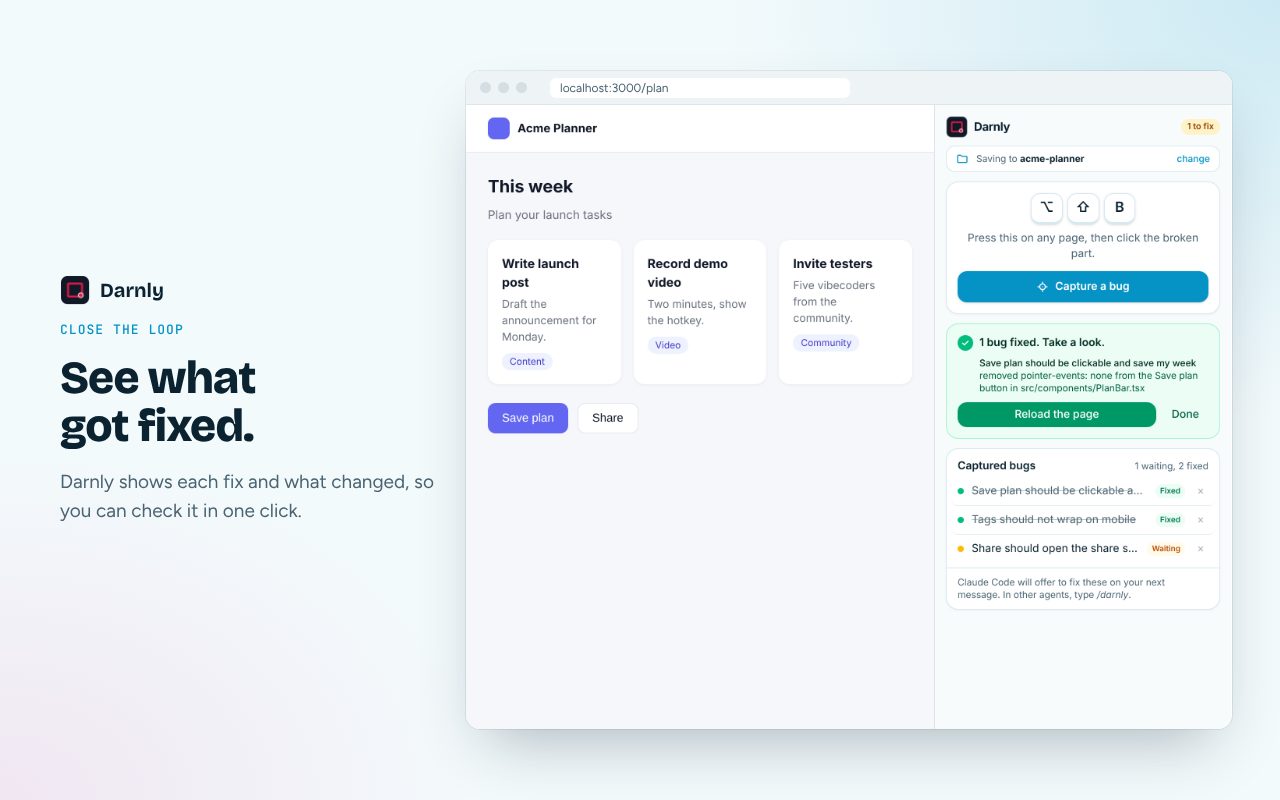
- "Your agent fixed it. Take a look." When your agent finishes a bug, a note appears under the menu bar icon and the panel keeps a card until you press Done. The icon shows how many bugs are still waiting.
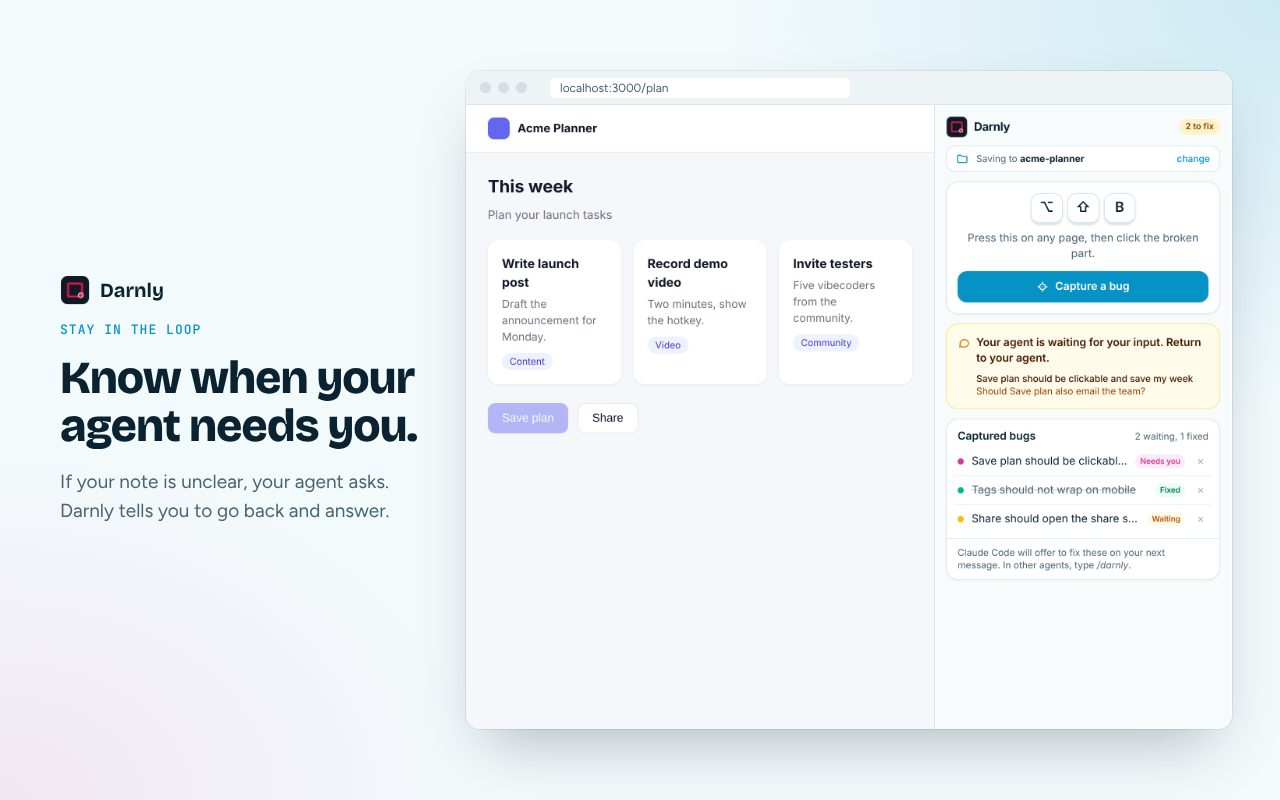
- "Your agent is waiting for your input." If your agent has a question about a bug, the panel shows it, so you know to go back to your agent.
- Cloud bugs show their status. Bugs sent to the cloud inbox are now marked Waiting, Asks you or Fixed, like bugs saved on this Mac.
- Change only this one, or all like it. The same optional chips as the extension, plus Spacing, Colour, Size and Text.
- Mark several elements for one bug. Hold Shift and click each one, then click the last one normally (or press Enter). The screenshot numbers every box.
- Email addresses hidden in reports, like passwords and tokens.
Chrome extension 0.3.3: how you got there, and what data was behind it
Some bugs only show up after a few clicks, or only with one old record. This release puts both in the report, so your agent can get to the same screen with the same kind of data, without you writing it all out.
- The steps that led to the bug. On localhost, and on sites you switch recording on for, reports list your last few actions: what you clicked, which field you typed in (never what you typed), which page you opened. Your agent follows them to see the bug for itself.
- Record the steps first. For a longer path, press Record the steps first in the panel, then use your app as usual. A small bar on the page counts the steps, with Pause, Done and Cancel. Each step keeps a small screenshot, so your agent sees each screen along the way.
- The data behind this element. Darnly finds the record that filled the part you clicked and adds its shape: field names, which ones are empty, how long the text is, how many items a list has, how old the record is. Never the values. Your agent can test with a record like yours instead of a fresh one. What is kept, and what isn't.
- Slow requests. If a request worked but took over 1.5 seconds, the report lists it, so "it's slow" bugs come with a lead.
- A count on the Darnly icon. The toolbar icon shows how many bugs are waiting for a fix, across your projects and your cloud inbox. It goes down as your agent fixes them.
Chrome extension 0.3.2: check the fix, and change only this one
- "How to check it's fixed." Every report ends with steps for your agent to check its own fix in a browser (Claude in Chrome, Playwright or the Chrome DevTools MCP), before it tells you it's done.
- Change only this one, or all like it. Two chips under the note answer the question agents ask most: is this one element, or every one that looks like it?
- What's wrong with it. Pick spacing, colour, size or text, and the report includes the element's current values for it.
- What's new, after an update. When Chrome updates Darnly, this page opens once at the new release.
8 Nov 2026: Darnly is in Claude's connector directory
In Claude (claude.ai and Claude Desktop), open Settings, then Connectors, and search for Darnly. Click Connect, sign in with Google, and say fix my Darnly bugs. No address to paste. See the listing or the setup steps.
Darnly for Mac 0.3.2: a panel like the extension's
- Click the menu bar icon for a panel: a Capture button, where bugs go (this Mac or the cloud inbox), and your recent bugs, each marked Waiting until your agent fixes it, then Fixed. Right-click the icon for the full menu.
- Update available. The app checks for a new version once a day and shows it in the menu, with the download or the
brew upgrade --cask darnlycommand.
Darnly for Mac 0.3.1: a public download
The Mac app, for bugs in Mac apps, the iOS Simulator and the Android Emulator, now has a public download, and catches up with the extension.
- Download it, or use Homebrew. Download for Mac (macOS 14 or later, signed and notarized), or run
brew install --cask maruthiram08/darnly/darnly. - Sets up your agent. When you pick a project folder, it offers to add the same note,
/darnlycommand and Claude Code hook as the extension, so one/darnlyfixes browser and Mac bugs together. - Project names in the cloud. In cloud mode the note box has a Project field, so your agent only fetches the bugs for the code it's working on.
- Darnly's colours on the welcome screen and note box, and the Darnly logo in the menu bar.
Chrome extension 0.3.1: close the loop
Capturing a bug was already quick. This release covers what happens after: starting the fix, answering your agent's questions, and checking the result.
/darnlyfixes every waiting bug. In Claude Code and Cursor, one command fixes the bugs in your project folder and your cloud inbox. In Codex, say "fix my Darnly bugs". How the loop works.- Claude Code offers to fix new bugs. Set up this project adds a hook, so when you start a session or send a message after capturing, Claude Code tells you how many bugs are waiting and offers to fix them.
- "Your agent is waiting for your input." If a note is unclear, your agent asks you in its own chat, and the panel shows this on the bug, so it never just looks stuck. In the cloud inbox this uses the new
ask_userMCP tool. - "1 bug fixed. Take a look." The panel now remembers what it last saw, so you get this card even if it was closed while the agent worked, with one line on what changed. For bugs on localhost, Reload the page shows the fix straight away; for a live site, it reminds you to deploy.
- Several projects, no re-linking. Each site remembers its own project, a folder or the cloud. On a new site, Darnly offers your recent projects to pick from. change now lets you pick another recent project, another folder, or the cloud. How it works.
- Delete one bug. Each bug in the list has a ×. In a project folder it deletes that bug's files; in the cloud, the bug and its picture.
- A cleaner panel. Darnly's own colours, a project bar showing where bugs go, big shortcut keys, and Waiting, Needs you and Fixed tags on every bug.
- Two agents don't fix the same bug. An agent marks the bug it's working on for 20 minutes, so another agent in the same project skips it.
To get it: after Chrome updates Darnly, open the panel and click Set up this project once more, then restart your agent.
Chrome extension 0.2.0: the cloud inbox
- An optional private inbox for projects whose code isn't on your computer. Sign in with Google, and each bug goes to your Darnly inbox instead of a folder.
- A remote MCP server at
https://api.darnly.dev/mcp, so Claude Code, Cursor, Codex and the Claude app fetch your bugs themselves withlist_bugs,get_bugandmark_fixed. Setup for each agent. - One list for all your projects. Agents only fix the bugs whose page belongs to the code they're working on.
Chrome extension 0.1: first release
- One key, one click, one sentence. Press Option+Shift+B, click the broken part, type what you expected.
- A report your agent can read: the screenshot with the element boxed in red, its selector, text, HTML and styles, the file and component that drew it on localhost, and console errors and failed requests from the last 60 seconds.
- Saved into your project as files in
.darnly/inbox/, with Set up this project adding a note to AGENTS.md and a skill. Code in the cloud? Copy picture and Copy details paste into your agent's chat. - Private by default: passwords, tokens and API keys are hidden before anything is saved, and
.darnly/is kept out of git.
Add Darnly to Chrome, or read the setup guide.